
Your AI assistant that knows your business.
Grain AI cross-cuts every feature, receipt scanning, voice chat that logs your day, caption generation from job photos, plain-English business questions, and PDF migration. Built into Bit & Grain, not an add-on tier.
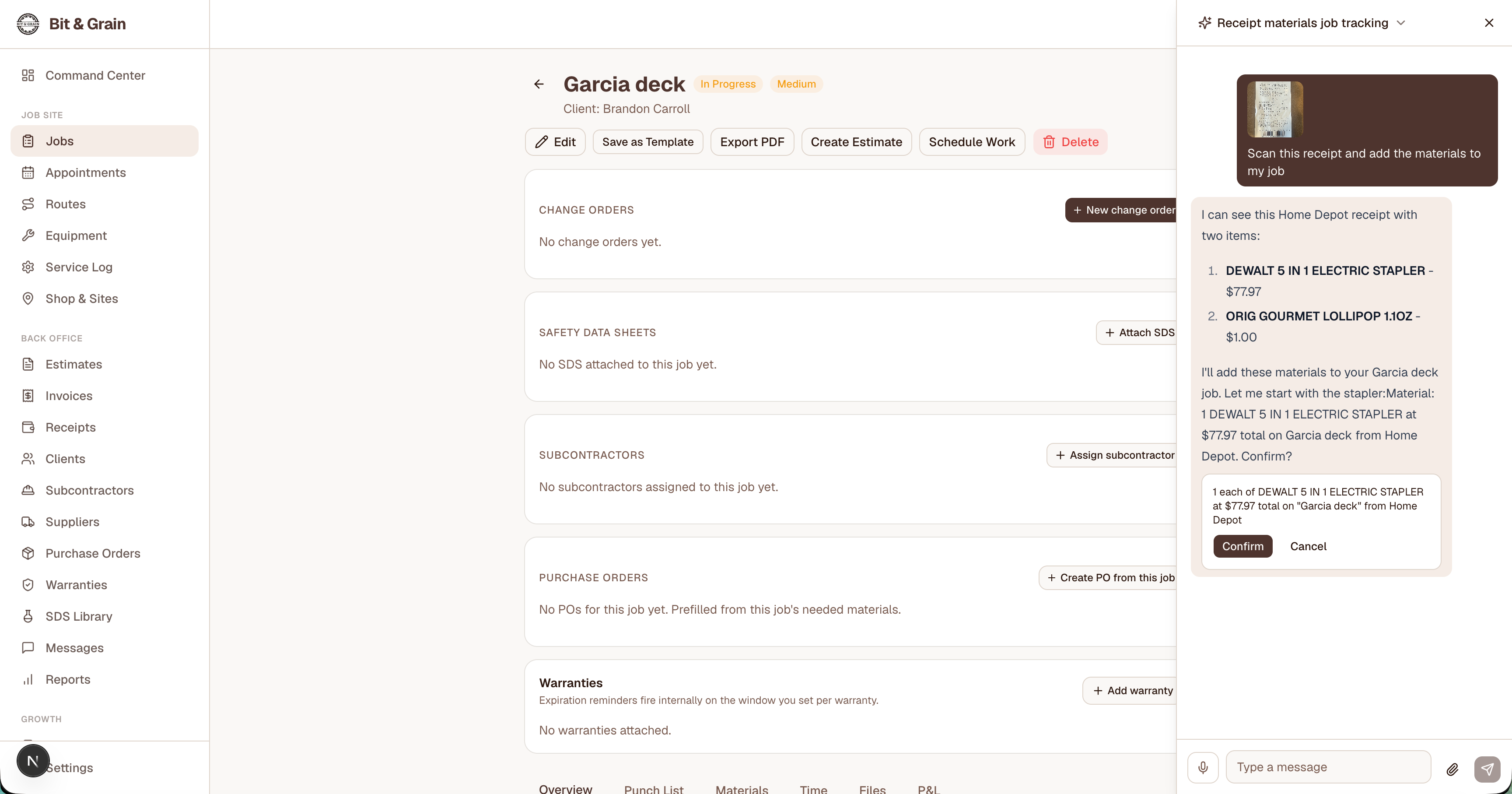
Grain AI receipt scanning: snap a receipt, confirm the job, done.
Receipt scanning that maps to the right job.
Snap a photo of any receipt in Grain AI chat. The AI extracts the vendor, amount, line items, and tax, then asks which job to log it against. The whole loop happens inside the chat surface; you never have to switch screens or type the receipt by hand.
The extracted receipt becomes a job-linked expense automatically. No re-keying, no third-party expense app, no separate inbox. Your job materials and your books stay in sync.
Try Receipt ScanningVoice chat that logs your day.
Voice mode is part of the same Grain AI chat surface. Tap the mic, talk normally, and the AI runs the same tools the typed chat runs, log a mileage trip, add a job note, mark a punch-list item complete, build a route to your next stop. No separate voice app, no separate conversational layer.
When you're driving between sites or your hands are full of tools, you can run real workflow operations without pulling out a keyboard. That's the difference between an AI assistant that talks at you and an AI assistant that works for you.
Try VoiceCaption generation from job photos.
Upload a job photo to the Compose surface and Grain AI drafts a Facebook and Instagram caption that names what you built, the materials you used, and the trade context. Hashtags too, relevant ones, not generic spam-tier filler.
You stay in control: edit the draft, swap a phrase, or rewrite from scratch. The AI does the blank-page lift; you ship the post in a minute instead of dropping it in the “I'll-do-it-later” folder.
See Caption GenerationPlain-English business questions, real answers.
Ask Grain AI about your business in plain English. Open jobs this week. Unpaid invoices over 30 days. Which client is your most profitable. Which materials you bought for the Henderson kitchen. The AI runs the query against your real data and answers in a sentence, no SQL, no “build a report” wizard, no spreadsheet export.
You can sign in on a phone in the truck and get an answer faster than you could open the dashboard. That's the in-app experience, the chat lives at the bottom of every screen.
Open chat lives on every authenticated screen. Sign in to try it.
Migration & PDF import.
The biggest reason contractors don't switch software is the data-migration cliff. Drop a PDF, CSV, or QuickBooks-style export into Grain AI and it extracts your jobs, clients, estimates, and invoices - then writes them into Bit & Grain as real records.
Grain AI handles the messy fields: misspelled client names, inconsistent address formats, line items in free-form notes. You review what was extracted before it lands in your account; nothing imports silently.
Try MigrationBuilt into every Bit & Grain surface.
Grain AI is not a chatbot pinned to the bottom-right corner of a SaaS dashboard. It's embedded in the workflows themselves, the receipt scanner that runs inside chat, the voice tools that move data into your jobs, the caption drafter that opens when you compose a post, the migration assistant that turns a PDF into real records. Same model, same tool layer, same context, wherever you are in the app.
Every AI capability, included.
Grain AI comes with your account. Unlimited questions, our most capable model, and every AI-powered feature turned on.
| Capability | What you get |
|---|---|
| Grain AI queries / day | Unlimited |
| AI model | Our most capable model |
| Receipt scanning (photo input) | |
| Caption generation (Facebook + Instagram) | |
| Migration & PDF import | |
| Voice Mode (hands-free chat tools) |
Unlimited questions on our most capable model, with photo input for receipts, caption generation, and migration all turned on.
Ready to put Grain AI to work?
Free for 30 days, no credit card. Unlimited Grain AI, our most capable model, and every AI-powered feature unlocked. $29/mo after that.